Springboard Settings
Search in Cydia: SBSettings
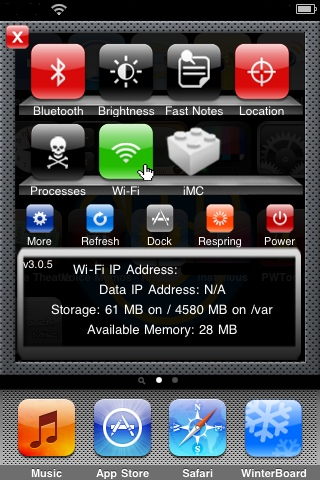
A very useful Cydia application that is easy to access. Slide your finger over the status bar at the top and the application is open. It slides down from the top of the device, and shows many different buttons. You can turn your Bluetooth on and off, as well as Locations, Wi-fi/Edge/3G, and respring your device. There is also buttons for your brightness, taking fast notes, processes, and you can even search some more in Cydia to toggle some more items on your iPhone or iPod Touch. There is five buttons on the bottom, and you can see referring to the picture below: More, Refresh, Dock(which if you click on can hold up to twelve applications in it), Respring, and Power. Under Power, you can reboot your device, power it off, lock it, or put it in safe mode. Clicking on more opens up the actual application for SBSettings, and allows you to manage themes for your SBSettings application. You can set the toggles which will appear when you slide your finger an open the app, change your SBSettings dock apps, hide icons from your iPod's home screen, Mobile Substrate Addons, like other Cydia Apps, and Extras and options, which will let you do many other things to your device, including adding a battery percentage next to your battery status.